Weaveworks · 2017 – 2023 · Head of Design · B2B Enterprise · DevOps & Platform Tooling

Infrastructure was becoming
a design problem.

Weaveworks was pioneering a new model of infrastructure — declarative, Git-native, built for Kubernetes at enterprise scale. Customers were platform engineering teams inside Fortune 500 organisations, financial institutions, and regulated industries. Deep B2B territory, with users who had zero tolerance for ambiguity in their tooling.

But there was no coherent design language for any of it. The tooling was powerful but opaque. Bianca joined as the first design hire, grew into Head of Design over six years, and built the practice from scratch — bringing multilingual fluency and cross-cultural communication skills to a globally distributed team and customer base.

The ask
The results
↑ Adoption
10M+
eksctl downloads — the open-source CLI co-created with AWS, now the official EKS cluster tool
↓ Complexity
1 UI
Unified design system across four distinct Weaveworks products, from OSS to Enterprise
↑ Reach
6 yrs
First UX hire to Head of Design — leading a multilingual, globally distributed team serving enterprise customers across Europe, North America, and Asia
Research Synthesis · 2017 – 2023
User flows — three personas, three paths through the platform
Designing for platform engineers meant designing for users who actively distrusted abstraction. Research was built around continuous proximity — contextual inquiry with engineering teams at financial institutions and regulated enterprises, conducted in English, French, and Mandarin. Three distinct users emerged, each with a fundamentally different mental model of what "the dashboard" was for. The flows below reflect how those users actually navigated the system: not the idealised path, but the one shaped by their mental model, their responsibilities, and the moments where the design had to make a decision for them.
Platform Engineer
Owns the cluster estate
Login
Overview
Goal?
New →
Pick Model
Configure
Monitor
Existing →
Open Cluster
Components
Scale / Fix
Done
Application Developer
GitOps without the ops
Login
Workloads
Synced?
Yes →
Detail View
Graph
No →
Recon Log
Inspect YAML
Fix & Sync
Verified
Security & Compliance Officer
Audit trails · policy enforcement
Login
Policies
Violations?
Yes →
Identify
Audit Trail
Remediate
None →
Workspaces
Verify Access
Compliant
2017 – 2022 · Shared Design Infrastructure
Weaveworks UI Components — the shared design system in code
A React component library built to unify the visual language across all Weaveworks products. Bianca was a core contributor — shaping the component API design, the Style Guide (colours, typography, spacing, layering), and the live documentation site that let engineers browse and use components directly. 29 components published to npm, installed with yarn add weaveworks-ui-components and used across Weave Cloud, Weave Scope, and Weave GitOps.
TimeTravel — scrubable infrastructure timeline
The TimeTravel control let operators rewind Weave Cloud to any point in time and replay how their infrastructure looked and behaved. Designed and built as a reusable component in the shared library, it became one of the most distinctive UX moments in the Weaveworks product suite.
What the library solved
Four distinct Weaveworks products — Weave Cloud, Weave Scope, WKP, and Weave GitOps — were being built by separate engineering teams. Without a shared component library, design diverged silently: different button styles, inconsistent spacing, conflicting colour usage. The ui-components library gave every team a single source of truth: documented, versioned, and hot-reloadable. Bianca shaped the component API design and the Style Guide that underpins it — making the design system real, not just aspirational.
↗ github.com/weaveworks/ui-components
Live demo — archived Oct 2022
The component documentation site rendered each component's prop table, live example, and source markup side by side — built with react-docgen, hosted on S3, now preserved on the Wayback Machine.

29 components · Style Guide Alert · Button · CircularProgress · Code · DataTable · Dialog · Dropdown · GraphEdge · GraphNode · Grid · GridColumn · GridRow · Input · ListItem · LogoProgress · MatchedText · Menu · MenuItem · PrometheusGraph · ResourceDial · Search · Tab · TabSelect · Text · TimeTravel · TimestampTag · WeaveCloudLogo · WeaveLogo · WeaveWorksLogo

Notable: PrometheusGraph — live metric time-series · TimeTravel — rewindable infrastructure state · GraphEdge & GraphNode — Scope topology primitives · ResourceDial — CPU/memory gauge
↗ Browse the archived demo — all 29 components ↗ Browse the archived Style Guide
Feb 2018
Weave Kubernetes Platform — Cluster Management UI
The WKP cluster management dashboard — the GUI built on top of eksctl. Operators could create, scale, and manage entire fleets of EKS clusters through a point-and-click interface rather than the terminal. The "Create Cluster" panel, cluster list, Models template library, and component views.
Create Cluster panel
Slide-out creation flow — Name, Model, Provider (AWS: EKS), Region, K8s Version, Node groups. The cluster list behind shows green "Ready" dots. The terminal-to-GUI moment.
↗ Full resolution
Cluster Management Dashboard
Fleet overview — "Clusters 14 + Create Cluster" with a table of all clusters across regions. Nav: Clusters · Models · Policies · Dashboards · Teams. The control room for a Kubernetes estate.
↗ Full resolution
Models — WKP
Models — cluster templates
"Models 3 + Add Model" — reusable cluster blueprints: Production cluster, Machine learning cluster. Define once, deploy anywhere. GitOps for infrastructure configuration.
↗ Full resolution
Scale Cluster
Scale Cluster view
Cluster scaling — node counts, status, and inline actions (View cluster, View dashboards). Surfacing the right affordances at the right moment without overloading the interface.
↗ Full resolution
Management UI
Management cluster UI
The management cluster itself — GitOps reconciliation status, workload links, and the entry point into the entire managed fleet. The dashboard for the dashboard.
↗ Full resolution
Cluster Components
Cluster Components
Pre-wired observability — Prometheus, Grafana, Flagger, Flux, Tiller, ingress — and their GitOps-managed status. Complexity bundled into clarity.
↗ Full resolution
Dec 2019 — KubeCon North America + AWS re:Invent
Live WKP Demo — the first public showing
The inaugural public demonstration of the WKP UI — the eksctl GUI shown live on stage at KubeCon and re:Invent 2019. An earlier iteration of the same system, already coherent and complete enough to demo to thousands. Shows the Create Cluster flow, Workspaces for multi-tenancy, and the Profiles concept.
Create a new cluster
Create cluster — Model selector open
The moment of cluster creation — Model dropdown open, showing Production cluster, Machine learning cluster, Search components. Node groups, type (m5.large), and desired capacity. First seen on stage at KubeCon 2019.
↗ Full resolution
Clusters list 2019
Clusters list — 2019 iteration
An earlier version of the cluster fleet view — the design before the Feb 2020 refinements. Shows the evolution of the system and the design thinking that led to the final product.
↗ Full resolution
Models 2019
Models — earlier iteration
The Model template library from the December demo. Pre-built cluster blueprints that could be attached at creation time — a key conceptual leap that simplified operator decisions at scale.
↗ Full resolution
Workspaces
Workspaces — multi-tenancy
Workspaces gave enterprise teams isolated namespaces within a shared cluster. Designing for multi-tenancy meant making invisible boundaries visible — without making the interface feel divided.
↗ Full resolution
Open Source · weaveworks/weave-gitops
Weave GitOps Dashboard
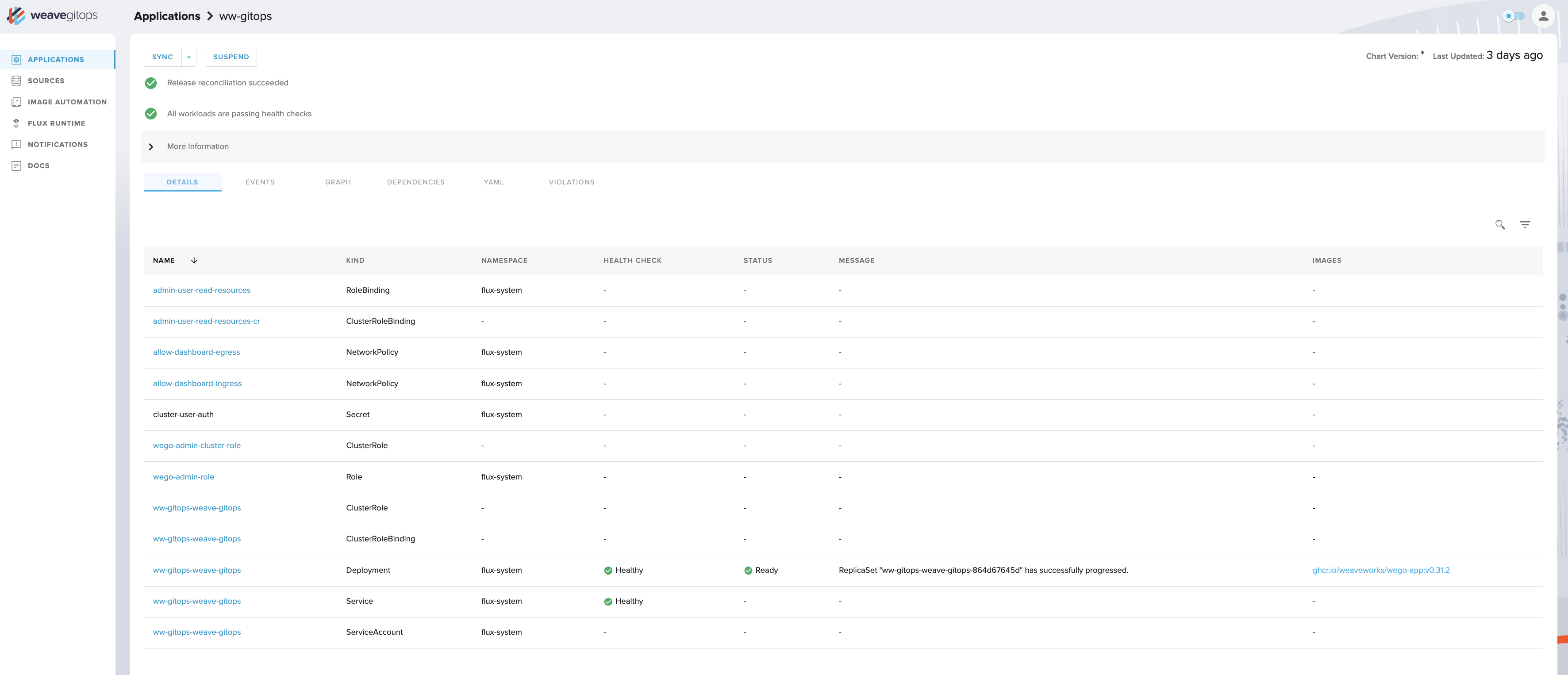
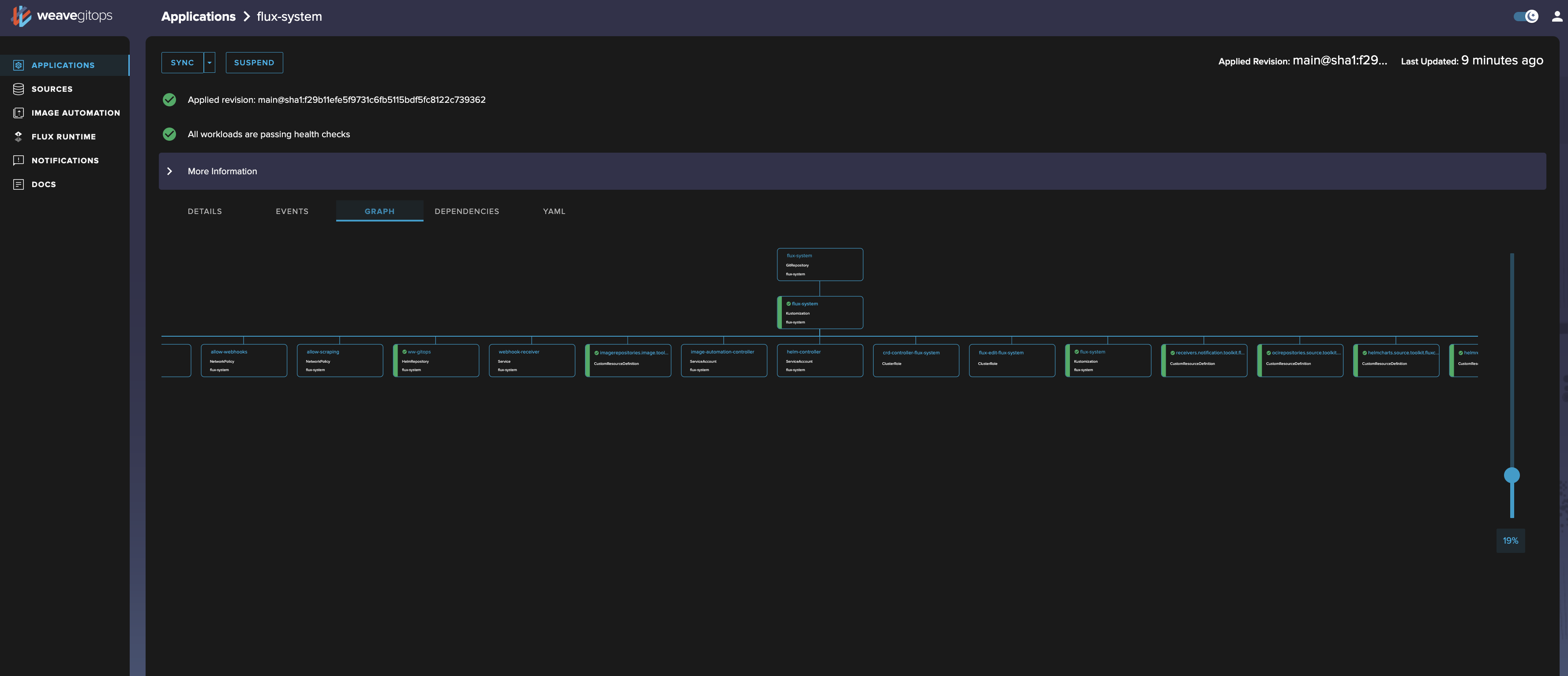
The open-source GitOps dashboard — where the design language matured into something both technically precise and visually coherent. Workloads, sources, graph views, YAML inspection, Flux runtime. The full GitOps feedback loop, made navigable. Live images from the public GitHub repository.
Workloads
Workloads list
The main workloads view — Kustomizations and HelmReleases with sync status, cluster, namespace, and timestamps. Dark sidebar navigation. The starting point for any operator session.
↗ Full resolution
Workload detail
Workload detail
Drill-down into a single workload — sync status, source, applied revision, conditions, events. Everything you'd otherwise get from five kubectl commands, in one scannable view.
↗ Full resolution
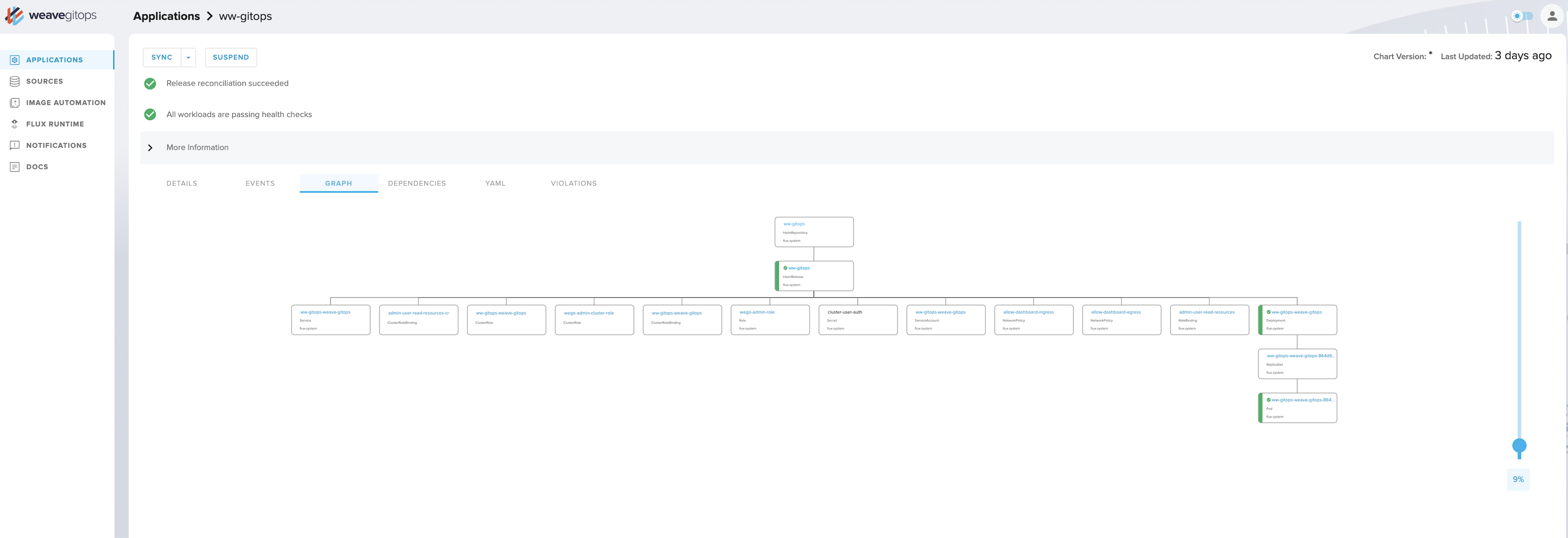
Graph view
Graph view
The topology graph — a visual map of how GitOps sources, kustomizations, and deployed objects relate. The same instinct that drove Weave Scope's topology visualiser, now applied to GitOps.
↗ Full resolution
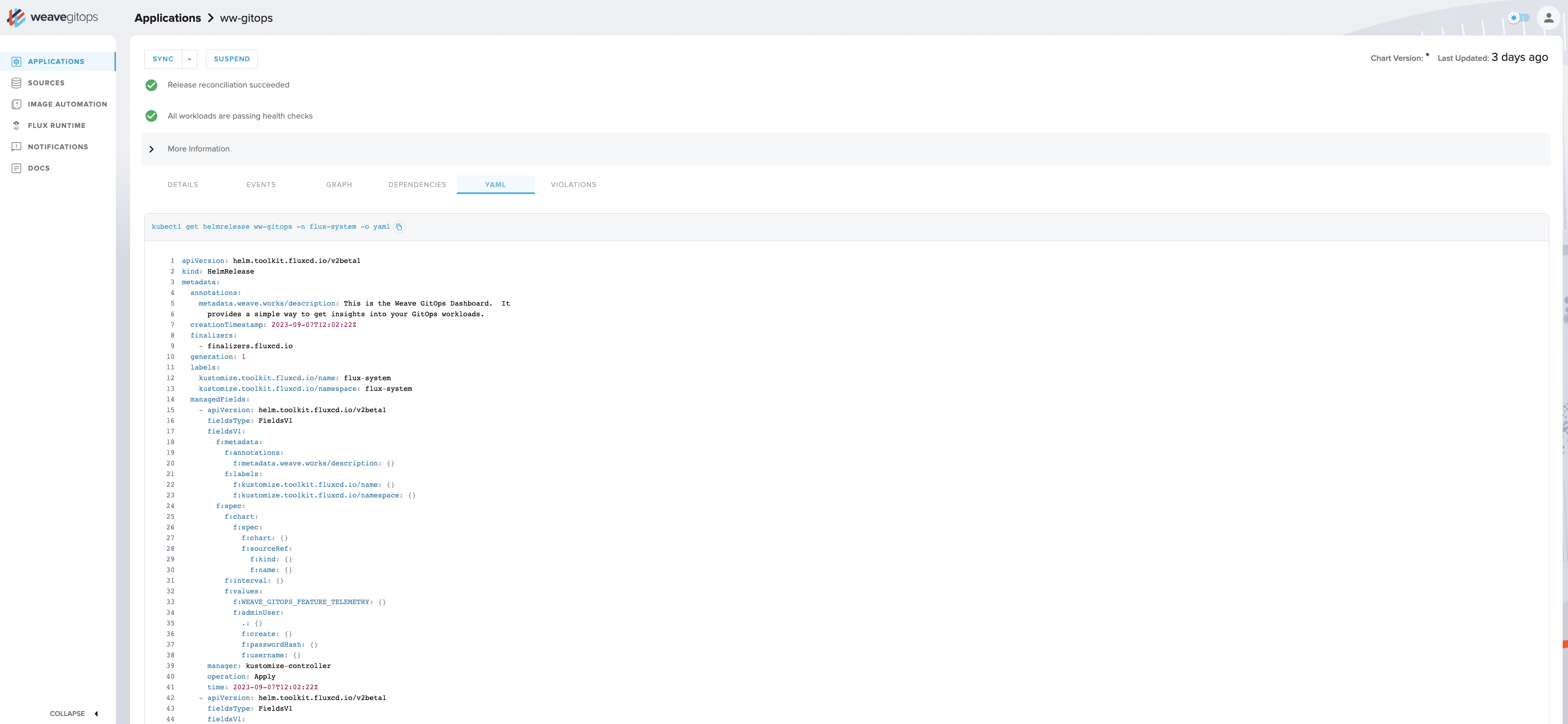
YAML view
YAML viewer
Inline YAML inspection — any resource, readable in context. No terminal. No context-switching. Designed for the operator who needs to verify, not just observe.
↗ Full resolution
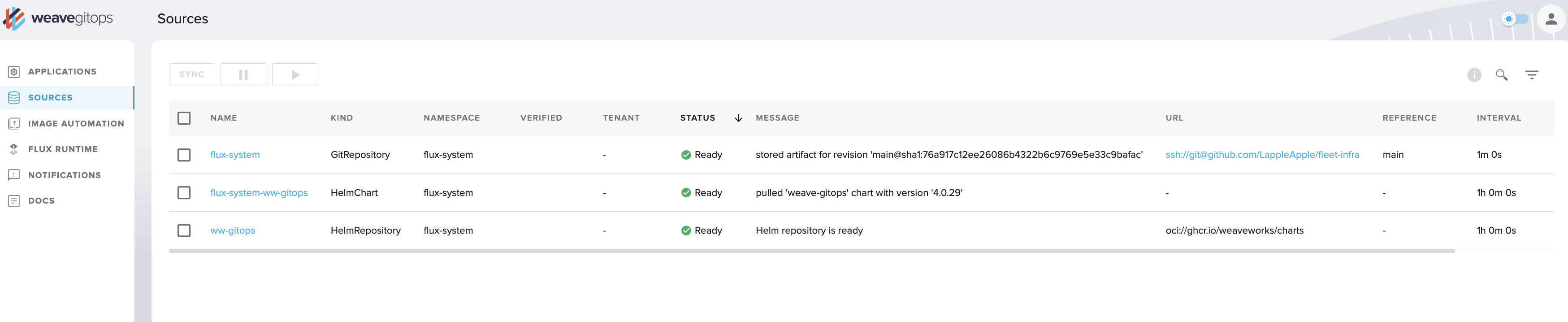
Sources
Sources
GitRepositories, HelmRepositories, Buckets — all tracked sources with sync intervals, last-fetched timestamps, and ready status. The inputs to the GitOps pipeline, surfaced clearly.
↗ Full resolution
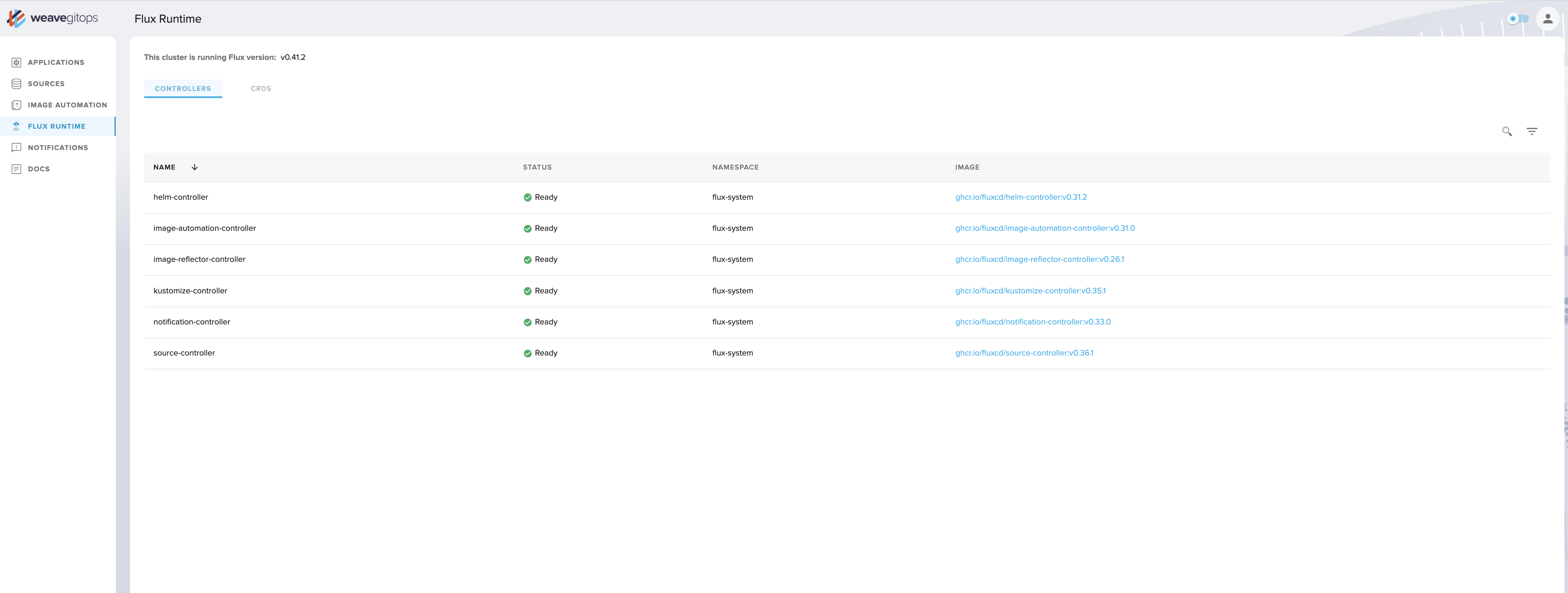
Flux Runtime
Flux Runtime
The Flux controllers themselves — source-controller, kustomize-controller, helm-controller, notification-controller — with versions and running status. Visibility into the engine under the hood.
↗ Full resolution
Enterprise Edition · Weave GitOps Enterprise 2023
Dark Mode — the system grown to enterprise scale
Weave GitOps Enterprise extended the OSS dashboard with multi-cluster fleet management, Templates, GitOpsSets, Terraform, Pipelines, Policies, and Workspaces. A dark mode toggle in the top-right let users switch themes. The full nav tells the story of how far the design system had grown. Live images from the public GitHub repository.
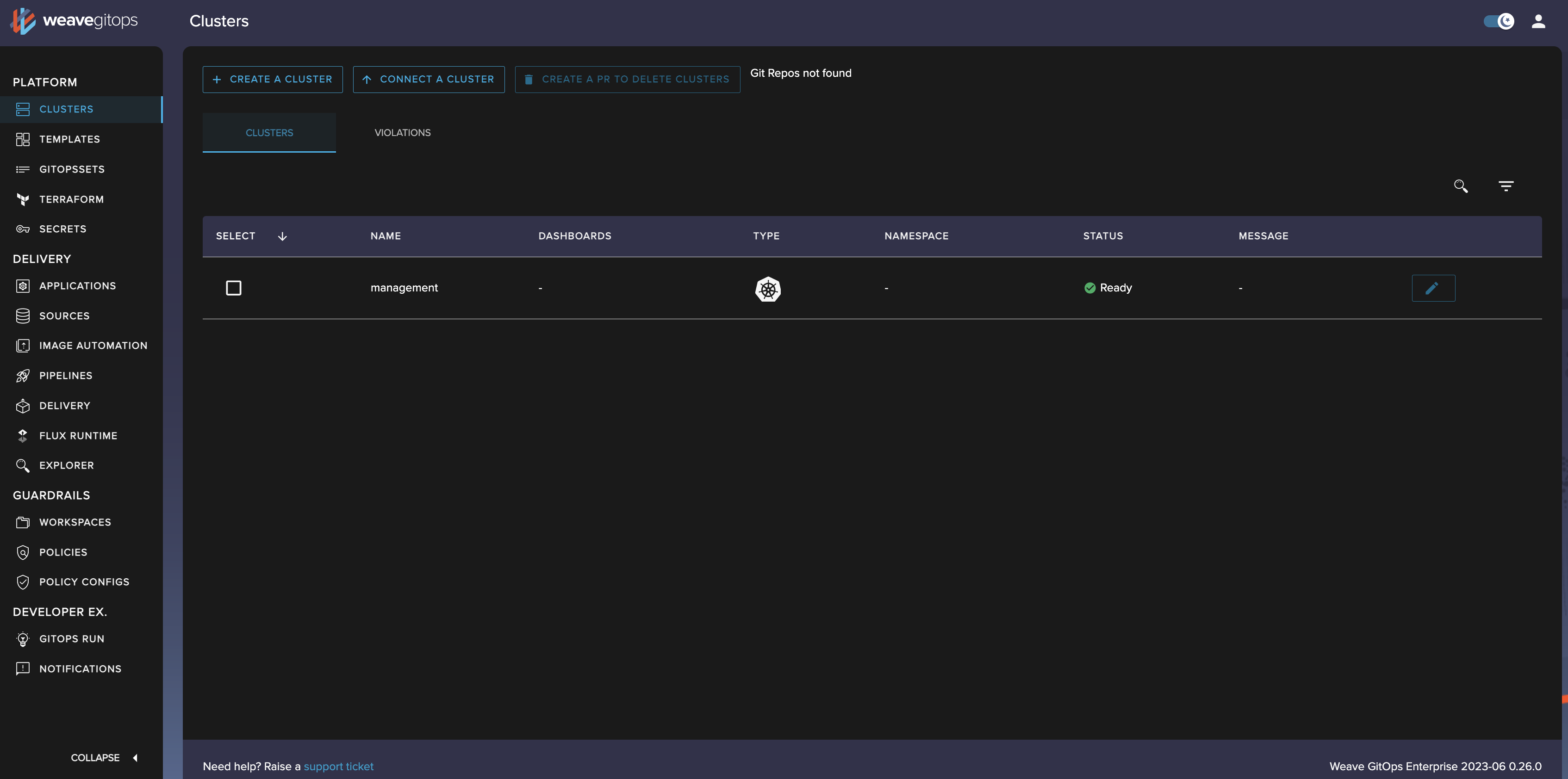
Enterprise dark mode
Enterprise dashboard — dark mode
The full Enterprise UI in dark mode at 3388×1684. Left nav: PLATFORM · DELIVERY · GUARDRAILS · DEVELOPER EX. The Clusters view with Create / Connect / Delete PR actions. The dark theme toggle visible top-right.
↗ Full resolution (3388×1684)
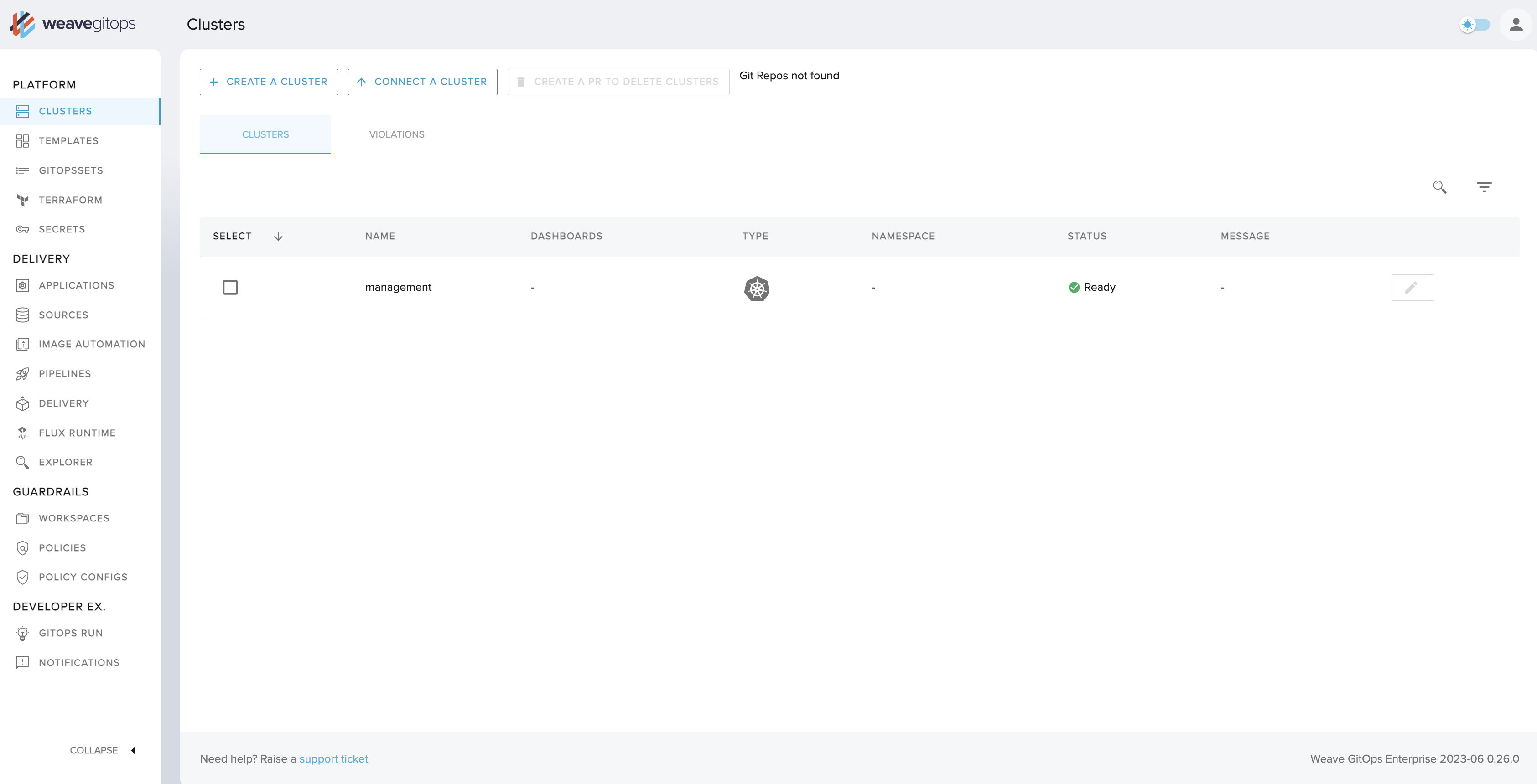
Enterprise light mode
Enterprise dashboard — light mode
The same Enterprise UI in light mode — multi-cluster fleet management, GitOps fleet view, and the full sidebar navigation. The polished end-state of six years of design iteration.
↗ Full resolution
Applications overview
Deployed applications with sync status, cluster, namespace, and source — all in a single scannable table. The GitOps feedback loop, made legible for teams who don't live in the terminal.
↗ Full resolution
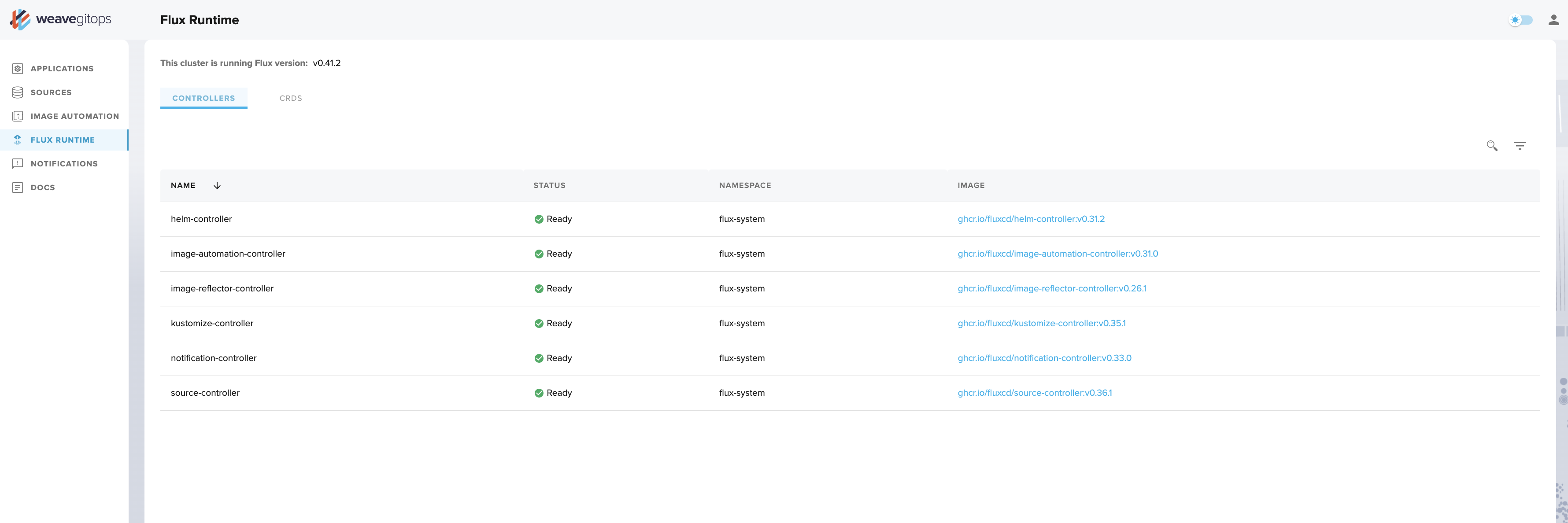
Flux Runtime
Flux Runtime controllers
All installed Flux controllers with version info and running status. Giving platform teams visibility into the GitOps engine powering their clusters, without needing kubectl.
↗ Full resolution
Sources
Sources
GitRepositories and HelmRepositories tracked by Flux — URL, branch, sync interval, ready status. The inputs, always visible, always current.
↗ Full resolution
Reconciliation
Reconciliation timeline
The full sync history and event log for a deployed application. The GitOps feedback loop made auditable — every reconciliation, surfaced in time order, with context.
↗ Full resolution
2018 – 2023 · Weaveworks + AWS
On eksctl and the Amazon partnership
eksctl is a CLI — the WKP dashboard is the eksctl UI. eksctl itself has no graphical interface. The Weave Kubernetes Platform cluster management dashboard (Sections 1 and 2 above) is the GUI that Bianca designed to make eksctl accessible to operators who shouldn't need the terminal. A point-and-click wrapper for a command-line superpower.

eksctl was co-created by Weaveworks and AWS in 2018 and announced as the official EKS CLI at AWS re:Invent 2019. It reached 10M+ downloads as an open-source project. In 2023, following Weaveworks's wind-down, AWS assumed full stewardship. It continues today at eksctl.io — a lasting artefact of the Weaveworks–AWS partnership that Bianca was central to.